Skip to content
  • Work
  • AI workflow
  • About
  • CV
NDNathaniel Diamond
Let's chat
  • Work
  • AI workflow
  • About
  • CV

Reach out at

studio@nathmond.co.uk

Currently open to new product design roles.

  • Home
  • Work
  • AI workflow
  • About
  • CV
  • CV (PDF)

© Nathaniel Diamond

[Back]

Talstrike·2024 – now·Mobile·AI

Taking a sports talent platform from prototype to 10K subscribers

Talstrike connects athletes, scouts and sports fans through talent discovery and sports content. As lead designer I took the product from an early prototype to launch, designed its AI-assisted athlete search and the role-based account model, and set up the design system the team builds on.

Role
Lead Product Designer
Timeline
Feb 2024 – Present
Team
4 designers (mentored), founder, backend and mobile engineers
Platform
iOS, Android, web

Part 1 of 2

AI-powered athlete discovery

Scouts describe the opportunity first; AI search then surfaces the athletes who fit the brief.

  1. Before: manual discovery
    1. 1Open scout dashboard
    2. 2Browse athlete list↺
    3. 3Open athlete profile
    4. 4Match for the opportunity?

      ↺ No — review the next athlete (back to step 2)

    5. 5Begin detailed evaluation

    Fig. 1 Too many athletes to scroll

    Scouts couldn't review hundreds of thousands of profiles for one opportunity, so real evaluation started far too late.

  2. Fig. 2 Start from the brief

    Scouts describe the opportunity first, so the AI search has real criteria to work from instead of guessing.
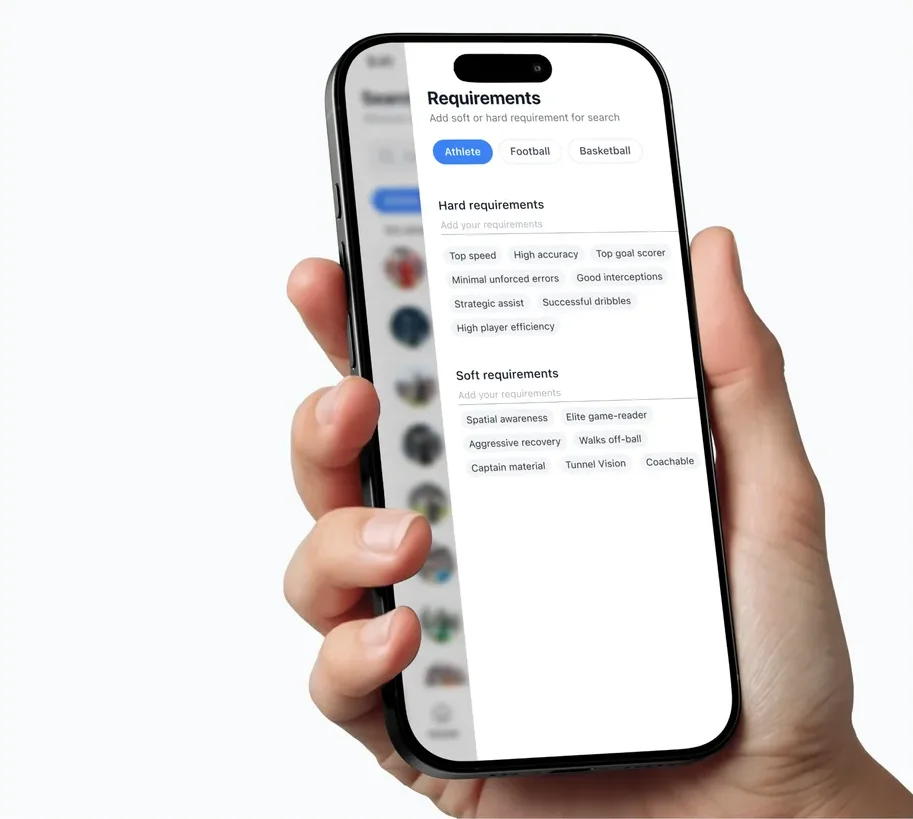
  3. AI-powered athlete discovery: Must-haves vs nice-to-haves

    Fig. 3 Must-haves vs nice-to-haves

    Hard requirements decide who's eligible; soft preferences only change the ranking. Flexibility is explicit, not implied.
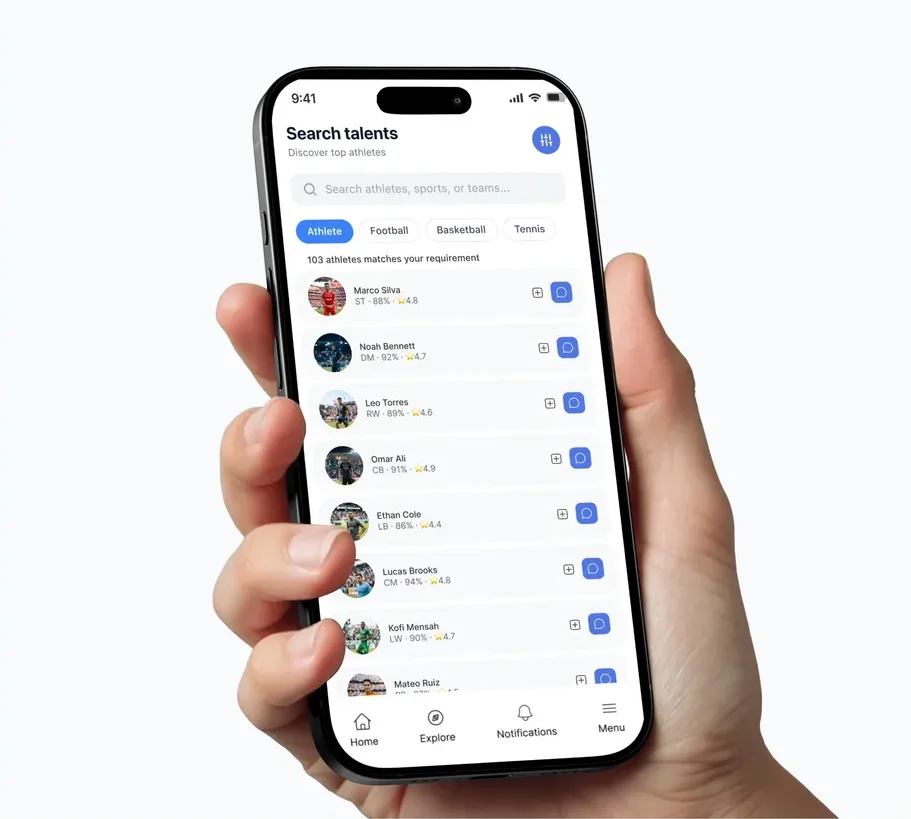
  4. AI-powered athlete discovery: Search that leads into the work

    Fig. 4 Search that leads into the work

    Results open straight into the scout's existing evaluation. The AI finds candidates; people still decide.

  5. After: AI-assisted search
    1. 1Enter opportunity brief
    2. 2Set hard and soft criteria
    3. 3Review requirements
    4. 4Run AI search
    5. 5Review relevant athletes
    6. 6Open profile for evaluation

    Fig. 5 Six clear steps

    Brief, criteria, review, search, shortlist, evaluate, instead of an endless scroll.

  6. Fig. 6 Relevance over speed

    Reaching an unsuitable athlete quickly isn't success, so testing covers no matches, missing data and refining a search.

Read the full write-up

Problem

Scouts could not reasonably scroll through hundreds of thousands of athletes to find the right fit for an opportunity. Manually reviewing profiles placed too much effort before meaningful evaluation could begin.

The design challenge was to capture what the scout needed, distinguish essential criteria from preferences, and translate those requirements into a search the backend could support.

Hypothesis

If scouts define the requirements of an opportunity before searching, our integrated AI evaluation system can use those criteria to search across Talstrike and surface athletes who best fit the brief.

Separating essential requirements from flexible preferences should help scouts narrow the field without unnecessarily excluding promising talent.

Goals

  • —Reduce the effort scouts spend finding suitable talent so they can begin real evaluation sooner.
  • —Give athletes greater visibility when their profiles match an opportunity.
  • —Reach relevant athlete profiles in a few clicks after entering the opportunity requirements.

Measured by: Time to the first relevant profile, interactions required to reach it, and the share of searches that lead to detailed athlete evaluation.

What I did

  1. 01I worked with the backend team to understand the infrastructure and translate the steps needed for AI-assisted search into the interface.
  2. 02I investigated how scouts frame an opportunity, so the search would begin with their requirements and feel natural to their decision-making.
  3. 03I introduced a distinction between hard requirements and soft preferences, so scouts keep essential criteria while staying flexible where it makes sense.

My role

My responsibility was turning scouting intent into an understandable search experience: gathering requirements, expressing priority, and connecting discovery to athlete evaluation.

Backend collaboration set the technical context. The AI system supports candidate discovery; scouts keep responsibility for judging suitability.

Solution

Search is centred on the opportunity. Scouts provide their requirements before the AI search begins and mark which criteria are mandatory and which are preferences. The system then searches Talstrike for athletes who fit, so scouts can focus on relevant profiles.

The central change is moving requirement definition ahead of discovery, so scouts no longer repeat the same assessment across a huge athlete list.

Key decisions

  1. 01Gather requirements before searching, so the scout's opportunity gives the system a meaningful starting point.
  2. 02Separate hard requirements from soft preferences, so flexibility is explicit.
  3. 03Keep detailed athlete evaluation one step from the results, so search leads straight into the scout's existing work.
  4. 04Matching rule: hard requirements decide eligibility; soft preferences influence ranking.

Trade-offs

  • —Manual browsing gives direct control but makes scouts repeat their assessment for every athlete.
  • —Treating every requirement as mandatory produces a narrow search; treating every requirement as optional weakens relevance. The hard/soft split resolves that tension.

Validation plan

  1. 01Representative scouts complete the same opportunity brief through manual discovery and through AI-assisted search. Observe whether they can express their criteria, understand hard vs soft requirements, recognise relevant results and begin evaluation.
  2. 02Cover edge cases: no matches, incomplete athlete information and searches that need refining. Record relevance judgements alongside time and clicks — reaching an unsuitable profile quickly is not success.

Outcome and next steps

An opportunity-led route into athlete discovery, with requirements collected before search and flexibility expressed through hard and soft criteria.

The intended outcome is less effort before evaluating suitable athletes and more visibility for athletes who match. Feature-level gains will be reported against a baseline using the measures above.

Bringing the scout's decision criteria into the search itself made “what is a good fit?” the central interaction question.

Next, I'd study where scouts change a requirement after seeing results, and whether the hard/soft distinction helps them do it confidently.
Part 2 of 2

Role-based accounts and navigation

Four account types, each with navigation built around its own work, connected by shared feeds.

  1. Before: one menu for everyone
    1. 1Select sporting role
    2. 2Complete account setup
    3. 3Enter available menus
    4. 4Find a relevant action
    5. 5Start role-specific task

    Fig. 1 One menu for four audiences

    Athletes, scouts, fans and admins all saw the same tools, so nobody could find theirs.

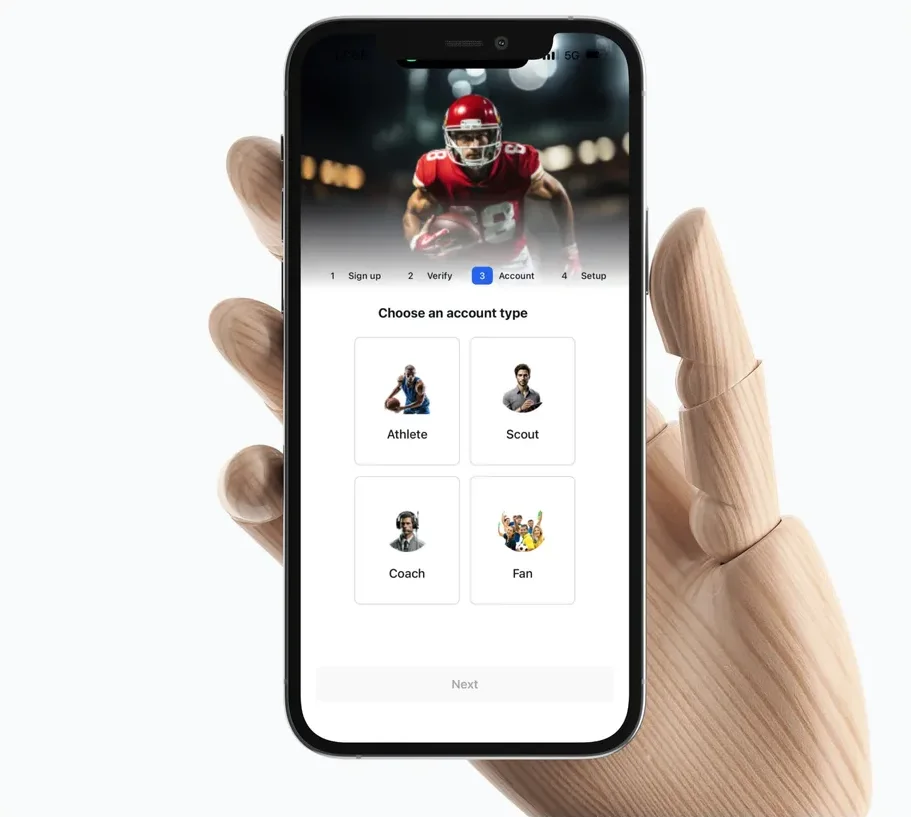
  2. Fig. 2 Learning the work first-hand

    I did practical scouting myself and interviewed scouted athletes to map what each role actually does.

  3. Role-based accounts and navigation: Navigation built around the job

    Fig. 3 Navigation built around the job

    Each account type gets a menu shaped by its work: showcasing talent, scouting, following sport or running the platform.

  4. Role-based accounts and navigation: Shared spaces stay shared

    Fig. 4 Shared spaces stay shared

    Feeds stay open to everyone, so specialised menus never cut people off from each other.

  5. After: role-based navigation
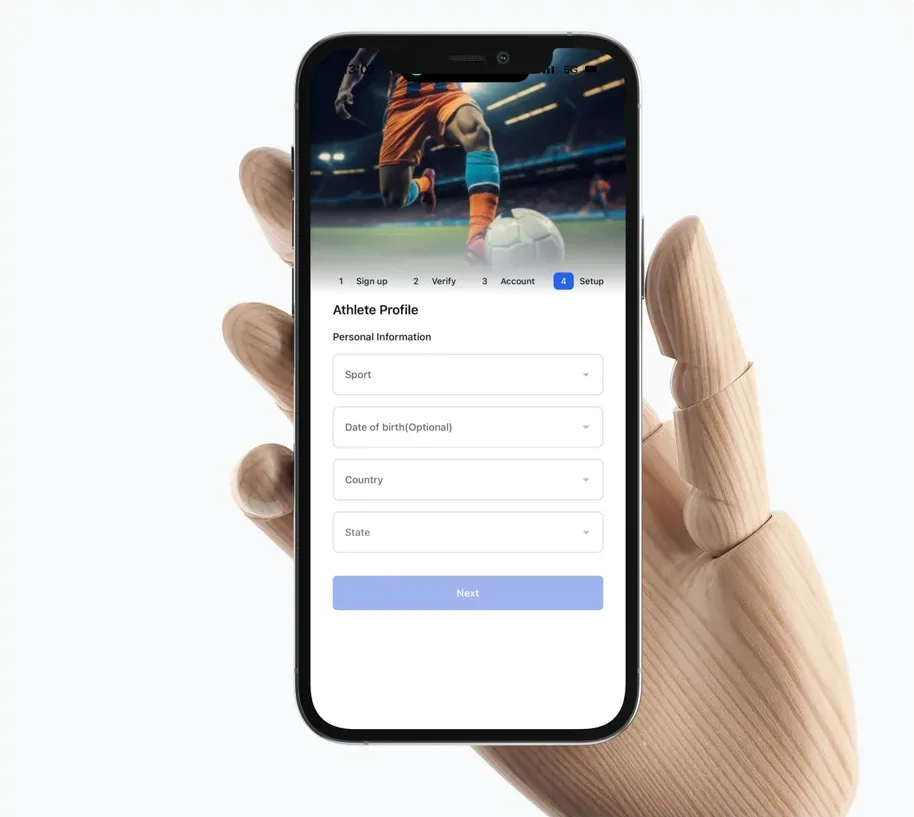
    1. 1Select account type
    2. 2Complete relevant setup
    3. 3Enter role-specific menu
    4. 4Choose primary task
    5. 5Use shared feeds or connections

    Fig. 5 The new flow

    Pick your role, set up, and land in a menu that's yours, with shared feeds one tap away.

  6. Fig. 6 Hiding isn't protecting

    A hidden menu doesn't stop an action, so permissions were designed separately from navigation.

Read the full write-up

Problem

An athlete showcasing talent doesn't need the same tools as a scout posting an opportunity, and fans and administrators have different purposes again. Showing everyone the same operational menu made the platform harder to understand.

The challenge was to make relevant actions easy to find while preserving the connections between athletes and scouts, and the shared sports conversations the platform depends on.

Hypothesis

If navigation reflects each account's role and preferences, people will find the actions that support their work more easily.

Keeping common spaces such as feeds open to every account type lets people communicate without exposing every audience to the same operational tools.

Goals

  • —Reduce menu ambiguity and make Talstrike easier to use for each audience.
  • —Athletes find their profile and talent-sharing tools; scouts find discovery and opportunity tools; everyone reaches shared feeds without entering another role's workflow.

Measured by: First-click accuracy, task completion without help, wrong-menu selections and confidence in choosing the next action — reported separately for each role.

What I did

  1. 01I took part in practical scouting activity to understand and document the work a scout performs, then used those findings to define their menu options.
  2. 02I interviewed scouted athletes to understand their side of the process and designed menus around their activities.
  3. 03I mapped where the two accounts intersect to support connection, and kept general areas such as feeds so the account structure wouldn't block communication.

My role

I turned scouting activity and athlete interviews into the account navigation model, deciding which actions belonged to each audience and where their experiences needed to meet.

Solution

Four primary account types organise access to the right menus: athletes around showcasing talent, scouts around finding talent and posting opportunities, fans around sports engagement, and administrators around platform operations.

Shared feeds keep communication open across audiences, so specialised navigation directs people to their work while common areas keep the community connected.

Key decisions

  1. 01Group accounts by the work people do, then make the relevant actions prominent in each menu.
  2. 02Keep common feed access so specialisation doesn't isolate anyone.
  3. 03Separate detailed sporting identities (coach, trainer and so on) from the four primary account types.

Trade-offs

  • —One universal menu keeps navigation uniform but exposes people to unrelated tasks. Fully separate experiences are focused but weaken connections between audiences. Four account types with shared areas balance relevance and connection.
  • —Hiding a menu isn't the same as enforcing a permission — interface visibility and access control have to be designed separately.

Validation plan

  1. 01Ask athletes, scouts and fans to complete representative tasks in their own account experience. Observe the first menu chosen, wrong turns and requests for help, and check they can still find shared feeds.
  2. 02For administrators, use the confirmed operational workflow and independently verify that restricted actions follow the intended permissions — including when reached through a direct link.

Outcome and next steps

The platform is organised around four account types with shared communication spaces, giving role-specific work a clear place in navigation.

Improvement is assessed by comparing task completion and wrong-menu selections with the earlier experience, reported by role so an average doesn't hide a difficult account experience.

Account design meant understanding both separate responsibilities and the points where people work together. Doing scouting myself and interviewing athletes gave me both sides of the same connection.

Next, I'd look at people with several sporting identities and check that account type, profile identity and preferences combine without making the menu unpredictable.

Results

subscribers in the first year
10K+10K+subscribers in the first year
sign-ups after the V2 launch
+85%+85%sign-ups after the V2 launch
faster front-end handoff (founder)
2×2×faster front-end handoff (founder)

Talstrike went from an early prototype to 10K+ subscribers in its first year, and the V2 redesign lifted sign-ups 85%. The design system I set up is the one the team still builds on.

Want the full story? Ask me for a walkthrough.

“Nathaniel was instrumental in scaling Talstrike past our early V1 prototype into a high-performing product. He established a solid UI foundation by introducing a structured design system that accelerated frontend handoff by 2x, significantly boosting our development velocity, coupled with great collaboration across cross-functional teams.”

Adams RasheedFounder, Talstrike

More case studies

Building payments that cross bordersSwiftpoint
Rewarding students for showing upBradcoin